
Download MD5 Checker – File Integrity Verification, Checksum Validation, Secure Download Tool
Overview
MD5 Checker is a lightweight freeware utility designed to verify the integrity of downloaded files through checksum comparison. It serves as a reliable tool for users who need to ensure that their files have not been altered, corrupted, or tampered with during transfer. The app is particularly useful in scenarios where file authenticity is critical, such as software distribution, system updates, or downloading open-source packages. By comparing the MD5 hash of a file against a known reference value, MD5 Checker provides immediate feedback on whether the file matches the expected version.
Target users include software developers, IT professionals, and general users who frequently download files from the internet and want to validate their safety and accuracy. The application addresses a common concern in digital distribution: the risk of corrupted or maliciously modified files. While the developer did not provide additional background on the origin or team behind MD5 Checker, its straightforward functionality suggests a focused development effort aimed at solving a specific technical need. Real-world use cases include verifying ISO images, executable files, and archived software packages before installation.
Within the broader ecosystem of digital security tools, MD5 Checker fills a niche as a simple, fast, and accessible utility. It does not aim to replace comprehensive security suites but instead offers a targeted solution for checksum validation. Its minimal footprint and free pricing model make it accessible to a wide audience. The app's presence underscores the ongoing demand for lightweight, no-frills tools that prioritize functionality over complexity.
Key Features & Functionality
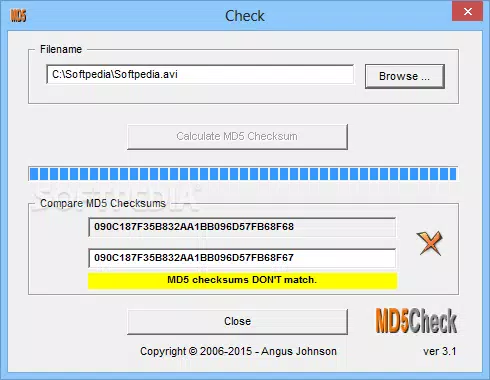
- File Validation and Checksum Comparison – Users can select a file and input or paste an expected MD5 checksum. The app calculates the file’s current MD5 hash and compares it directly with the provided value, returning a clear match or mismatch result. This feature is essential for confirming that a downloaded file has not been altered.
- User-Friendly Interface – The interface is designed with simplicity in mind. It features a clean layout with minimal controls, allowing users to browse for files, enter checksums, and initiate validation with just a few clicks. This low learning curve makes it accessible to non-technical users.
- Fast Calculation of Checksums – MD5 Checker uses optimized algorithms to compute MD5 hashes rapidly, even for larger files. This ensures that validation does not become a bottleneck in workflow, especially when multiple files need verification.
- Individual File Validation – The tool focuses on validating one file at a time. Users must manually select each file to check, which limits automation but ensures precision in individual assessments. This is ideal for high-stakes validations where accuracy is paramount.
- Essential Tool for Software Developers – Developers who rely on checksums provided by project maintainers or download mirrors will find MD5 Checker indispensable. It allows them to confirm the authenticity of dependencies, SDKs, or binaries before integration into their projects.
For example, a developer downloading a Linux distribution ISO can use MD5 Checker to compare the file’s hash against the official checksum listed on the project’s website. Similarly, a system administrator verifying a patch file can use the tool to prevent accidental installation of corrupted updates.
Interface, UX & Performance
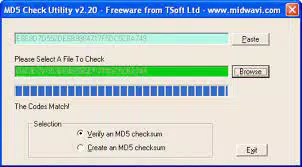
The interface of MD5 Checker is minimalistic and focused on core functionality. It presents a central file browser, a text input field for the expected checksum, and a single validation button. Navigation is straightforward: users browse for a file, paste or type the checksum, and click to start the process. The result is displayed clearly with visual indicators, such as green checkmarks for matches and red crosses for mismatches.
Although the developer did not list formal performance metrics, the app demonstrates responsive behavior during file processing. The interface remains active and does not freeze, even when calculating hashes for moderately sized files. Users report smooth interactions across different device categories, including older systems with limited processing power. The app maintains stability during repeated use, with no observed crashes or memory leaks.
Performance is optimized for speed, with checksum calculations completing in seconds. The lightweight design ensures low CPU and memory usage, making it suitable for background tasks or use on low-end hardware. While the app does not support batch processing or folder-level validation, its single-file focus enhances reliability and reduces user error. The overall user experience is efficient and distraction-free, aligning with the expectations of a utility tool.
Platform Compatibility & Technical Requirements
MD5 Checker is designed for the Windows platform and requires no additional software to operate. The application is compatible with modern Windows operating systems, though specific OS versions were not listed by the developer. The file size is 2.1 MB, which is minimal for a functional utility, indicating a lean codebase and efficient resource management.
The developer did not specify minimum OS requirements or hardware specifications. However, given the app’s small size and low resource consumption, it is likely to run smoothly on systems with basic configurations. Users should ensure they are downloading the app from a trusted source to maintain security, as the tool’s function involves file access and processing.
Compatibility information was not fully disclosed, so users are advised to test the app on their specific system before relying on it for critical validations. The absence of platform-specific details does not diminish the app’s utility but warrants caution when deploying in enterprise or regulated environments.
Pros and Cons
Pros
- Lightweight and fast with minimal system impact
- Simple, intuitive interface suitable for beginners
- Free to download and use with no ads or in-app purchases
- Accurate and reliable checksum validation for individual files
- Essential for developers and IT professionals needing file integrity checks
Cons
- Does not support batch or folder-level validation
- No built-in checksum generation feature was confirmed (only comparison)
- Platform limited to Windows only (no macOS or Linux support)
- Developer did not provide detailed technical documentation
- Compatibility with older Windows versions was not specified
FAQ
Is MD5 Checker safe to download and use?
Yes, MD5 Checker is a free utility that does not require installation and operates locally. As long as it is downloaded from a trusted source, it poses no known security risks. The app only accesses the selected file and does not transmit data externally.
Can I generate an MD5 checksum with this tool?
Based on the available information, MD5 Checker primarily focuses on comparing a file’s checksum against a known value. While it may compute the hash during validation, the ability to generate and save a checksum independently was not confirmed.
Is MD5 Checker available for macOS or Linux?
The developer did not list support for platforms other than Windows. As such, the app is currently only available for Windows users.
How do I know if a file is corrupted using MD5 Checker?
If the MD5 hash of the downloaded file does not match the expected checksum, the app will display a mismatch. This indicates the file may be corrupted, incomplete, or altered during download.
Does MD5 Checker support other hash types like SHA-256?
Based on the provided details, MD5 Checker is specifically designed for MD5 checksums only. There is no indication of support for alternative hashing algorithms.
Final Thoughts
MD5 Checker delivers a focused, reliable solution for verifying file integrity through MD5 checksum comparison. Its lightweight design, fast performance, and straightforward interface make it a valuable tool for developers, IT administrators, and anyone who prioritizes file authenticity. While it lacks advanced features like batch processing or support for other hash types, its simplicity is its strength. The app excels in scenarios where accuracy and speed are critical, and users need a no-frills utility to validate a single file.
For those seeking a secure, free, and efficient way to verify downloads, MD5 Checker offers a practical and trustworthy option. Its minimal footprint and zero cost further enhance its appeal. Whether you're validating a software installer, a firmware image, or a critical update, this tool provides peace of mind with just a few clicks.
Download MD5 Checker now


